
관리 메뉴

FireDrago
[Spring] 파일업로드 본문
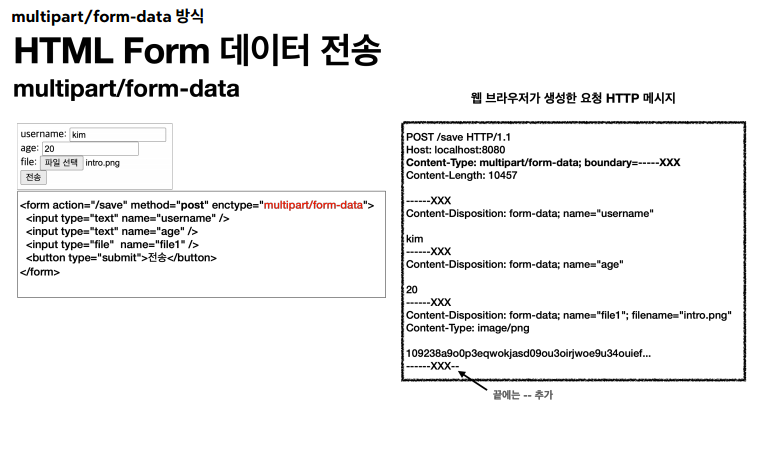
파일을 업로드 하려면 바이너리 데이터를 업로드 해야한다.
또한 문자 데이터와 바이너리 데이터를 함께 전송해야 할때도 있다.
이런 상황을 위해 HTTP 는 multipart/form-data 전송방식을 제공한다.
multipart/form-data 방식은 각각의 전송항목을 구분하여 별도의 헤더와 바디로 전송한다.
서블릿과 스프링에서는 어떤 방법으로 multipart/form-data를 처리하는지 살펴보자
<서블릿>
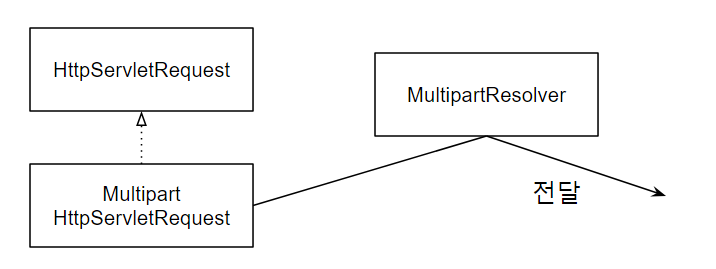
서블릿은 multipart/form-data 가 전송되면, MultipartResolver가 HttpRequest를 상속받은
MultipartHttpServletRequest를 전달한다. 이를바탕으로 서블릿은 파일을 다룰 수 있다.
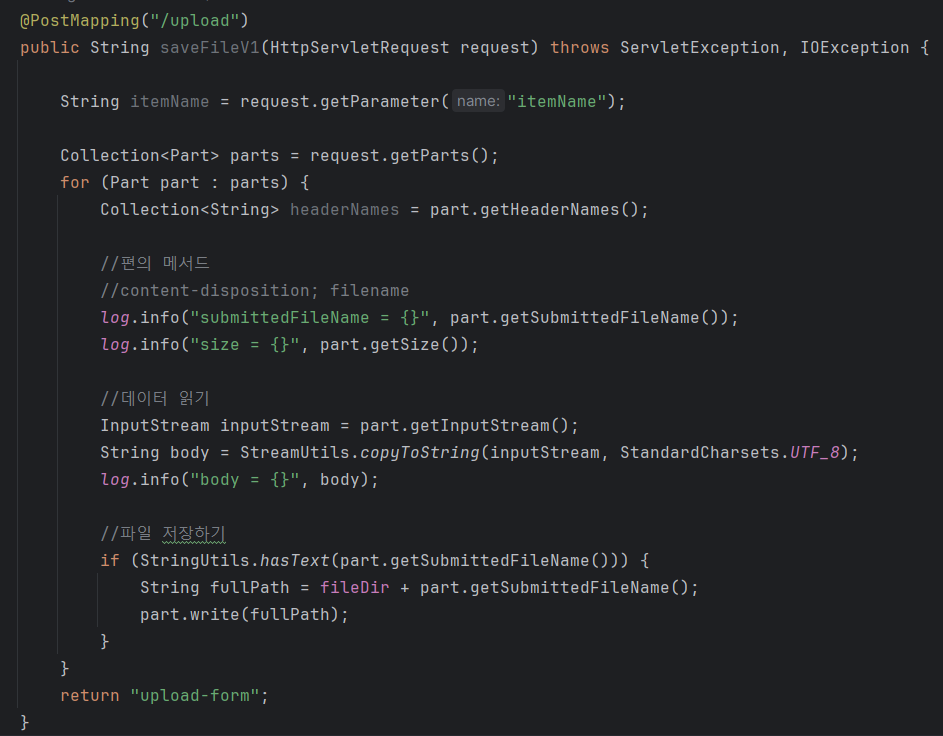
request.getParts( ) : 멀티파트의 각 파츠 정보 제공
part.getInputStream( ) : 파일 데이터 읽기
part.write(경로) : 파일 경로에 저장
<스프링>
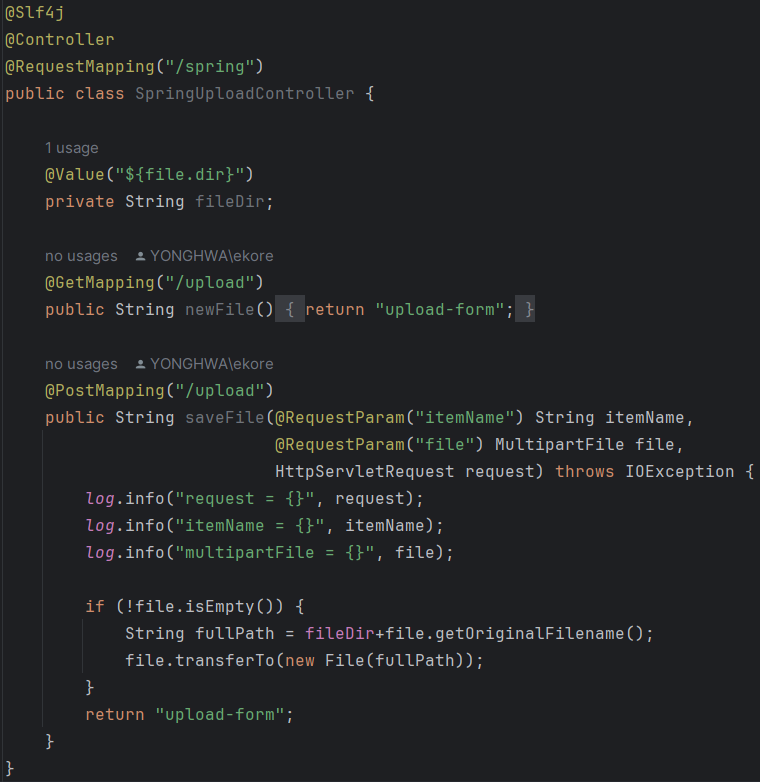
스프링은 @Request / ModelAttribute MultipartFile file 을 통해 더 쉽게 파일을 다룰 수 있다.
file.getOriginalFileName() : 파일명 조회
file.transferTo(new File(경로)) : 파일 저장
<스프링으로 파일 업로드, 다운로드 실습>
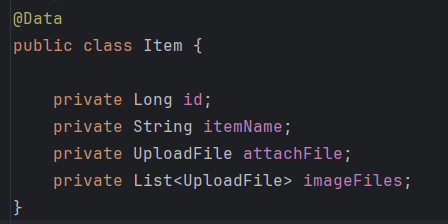
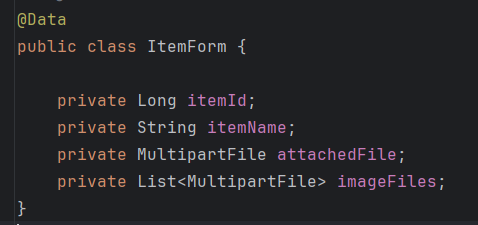
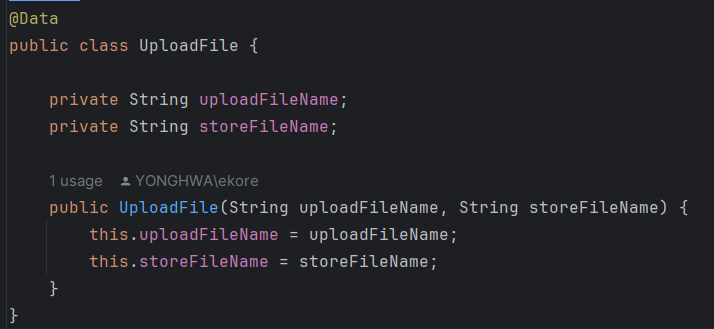

package hello.upload.controller;

import hello.upload.domain.Item;
import hello.upload.domain.ItemRepository;
import hello.upload.domain.UploadFile;
import hello.upload.file.FileStore;
import lombok.Getter;
import lombok.RequiredArgsConstructor;
import lombok.extern.slf4j.Slf4j;
import org.springframework.core.io.Resource;
import org.springframework.core.io.UrlResource;
import org.springframework.http.HttpHeaders;
import org.springframework.http.ResponseEntity;
import org.springframework.stereotype.Controller;
import org.springframework.ui.Model;
import org.springframework.web.bind.annotation.*;
import org.springframework.web.servlet.mvc.support.RedirectAttributes;
import org.springframework.web.util.UriUtils;

import java.io.IOException;
import java.net.MalformedURLException;
import java.nio.charset.StandardCharsets;
import java.util.List;

@Slf4j
@Controller
@RequiredArgsConstructor
public class ItemController {

    private final ItemRepository itemRepository;
    private final FileStore fileStore;

    @GetMapping("/items/new")
    public String newItem(@ModelAttribute ItemForm form) {
        return "item-form";
    }

    @PostMapping("/items/new")
    public String saveItems(@ModelAttribute ItemForm form,
                            RedirectAttributes redirectAttributes) throws IOException {
        UploadFile uploadFile = fileStore.storeFile(form.getAttachedFile());
        List<UploadFile> uploadFiles = fileStore.storeFiles(form.getImageFiles());

        //데이터베이스 저장
        Item item = new Item();
        item.setAttachFile(uploadFile);
        item.setImageFiles(uploadFiles);
        item.setItemName(form.getItemName());
        itemRepository.save(item);

        redirectAttributes.addAttribute("itemId", item.getId());
        return "redirect:/items/{itemId}";
    }

    @GetMapping("/items/{itemId}")
    public String items(@PathVariable("itemId") Long id, Model model) {
        Item item = itemRepository.findById(id);
        model.addAttribute("item", item);
        return "item-view";
    }

    @ResponseBody
    @GetMapping("/images/{fileName}")
    public Resource downloadImage(@PathVariable("fileName") String fileName) throws MalformedURLException {
        return new UrlResource("file:" + fileStore.getFullPath(fileName));
    }

    @GetMapping("/attach/{itemId}")
    public ResponseEntity<Resource> downloadAttach(@PathVariable("itemId") Long itemId) throws MalformedURLException {

        Item item = itemRepository.findById(itemId);
        String storeFileName = item.getAttachFile().getStoreFileName();
        String uploadFileName = item.getAttachFile().getUploadFileName();
        UrlResource resource = new UrlResource("file:" + fileStore.getFullPath(storeFileName));

        log.info("uploadFileName={}", uploadFileName);
        String encodedUploadFileName = UriUtils.encode(uploadFileName, StandardCharsets.UTF_8);
        String contentDisposition = "attachment; filename=\"" + encodedUploadFileName + "\"";

        return ResponseEntity.ok()
                .header(HttpHeaders.CONTENT_DISPOSITION, contentDisposition)
                .body(resource);
    }
}'프로그래밍 > Spring' 카테고리의 다른 글
| [Spring] DB 예외처리 (0) | 2024.03.02 |
|---|---|
| [Spring] 트랜잭션과 스프링 (0) | 2024.02.28 |
| [Spring] 스프링 타입 컨버터와 포매터 (0) | 2024.02.21 |
| [Spring] 스프링 API 예외처리 (0) | 2024.02.20 |
| [Spring] 스프링 예외처리와 오류페이지 (0) | 2024.02.17 |
'프로그래밍/Spring' Related Articles
more


