
FireDrago
[Spring] 스프링이 지원하는 프록시 본문
프록시 팩토리

스프링은 동적 프록시를 통합해서 편리하게 만들어주는 프록시 팩토리( ProxyFactory )라는 기능을 제공한다.
프록시 팩토리는 인터페이스가 있으면 JDK 동적 프록시를 사용하고, 구체 클래스만 있다면 CGLIB를 사용한다.
그리고 이 설정을 변경할 수도 있다. 이전에는 상황에 따라서 JDK 동적 프록시를 사용하거나 CGLIB를 사용해야 했다면, 이제는 이 프록시 팩토리 하나로편리하게 동적 프록시를 생성할 수 있다.
Advice 도입
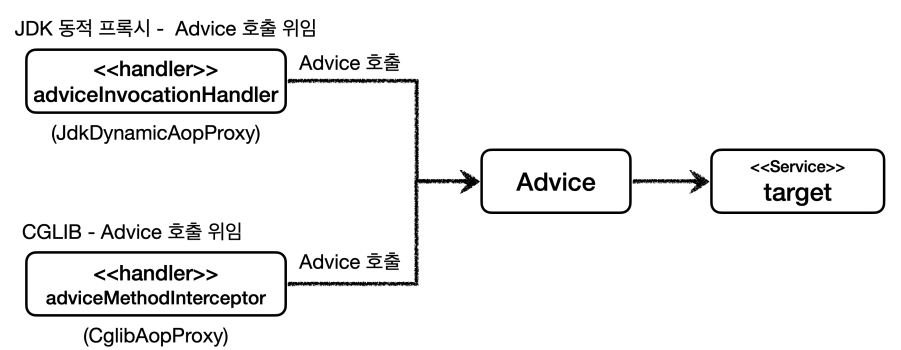
프록시 팩토리를 사용하면 Advice 를 호출하는 전용 InvocationHandler , MethodInterceptor 를 내부에서사용한다.
Advice는 JDK 동적 프록시가 제공하는 InvocationHandler 와 CGLIB가 제공하는 MethodInterceptor 둘을 개념적으로 추상화 한 것이다. 프록시 팩토리를 사용하면 둘 대신에 Advice 를 사용하면 된다.
@Slf4j
public class TimeAdvice implements MethodInterceptor {

    @Override
    public Object invoke(MethodInvocation invocation) throws Throwable {
        log.info("TimeProxy 실행");
        long startTime = System.currentTimeMillis();

        Object result = invocation.proceed();

        long endTime = System.currentTimeMillis();
        log.info("TimeProxy 종료 resultTime={}ms", endTime - startTime);
        return result;
    }
}Advice를 만들때는 MethodInterceptor 인터페이스를 구현한다.
invocation.proceed() 를 호출하면 target 클래스를 호출하고 그 결과를 받는다.
target 클래스의 정보는 (MethodInvocation invocation) 안에 모두 포함되어있다.
프록시를 생성하는 단계에서 프록시 팩토리에 target 정보를 미리 전달하기때문이다.
@Test
@DisplayName("인터페이스가 있으면 JDK 동적 프록시 사용")
void interfaceProxy() {
    ServiceInterface target = new ServiceImpl();
    // 구체클래스냐 인터페이스 구현체냐에 따라, JDK동적 프록시, CGLib 사용
    ProxyFactory proxyFactory = new ProxyFactory(target);
    // advice 설정
    proxyFactory.addAdvice(new TimeAdvice());
    ServiceInterface proxy = (ServiceInterface) proxyFactory.getProxy();

    log.info("targetClass={}", target.getClass());
    log.info("proxyClass={}", proxy.getClass());

    // 프록시를 통한 실제 객체 메서드 호출 (advice 함께 실행)
    proxy.save();

    assertThat(AopUtils.isAopProxy(proxy)).isTrue();
    assertThat(AopUtils.isJdkDynamicProxy(proxy)).isTrue();
    assertThat(AopUtils.isCglibProxy(proxy)).isFalse();
}
new ProxyFactory(target) : 프록시 팩토리를 생성할 때, 생성자에 프록시의 호출 대상을 함께 넘겨준다.
프록시 팩토리는 이 인스턴스 정보를 기반으로 프록시를 만들어낸다. 만약 이 인스턴스에 인터페이스가 있다면
JDK 동적 프록시를 기본으로 사용하고 인터페이스가 없고 구체 클래스만 있다면 CGLIB를 통해서 동적 프록시
를 생성한다. 여기서는 target 이 new ServiceImpl() 의 인스턴스이기 때문에 ServiceInterface 인
터페이스가 있다. 따라서 이 인터페이스를 기반으로 JDK 동적 프록시를 생성한다.
proxyFactory.addAdvice(new TimeAdvice()) : 프록시 팩토리를 통해서 만든 프록시가 사용할 부가기능 로직을 설정한다
proxyFactory.getProxy() : 프록시 객체를 생성하고 그 결과를 받는다
@Test
@DisplayName("ProxyTargetClass 옵션을 사용하면 인터페이스가 없어도 CGLIB를 사용한다")
void proxyTargetClass() {
    ServiceInterface target = new ServiceImpl();
    ProxyFactory proxyFactory = new ProxyFactory(target);
    proxyFactory.addAdvice(new TimeAdvice());
    // 인터페이스가 있어도, 강제로 CGLIB 사용 , 스프링부트 AOP 기본값
    proxyFactory.setProxyTargetClass(true);
    ServiceInterface proxy = (ServiceInterface) proxyFactory.getProxy();

    log.info("targetClass={}", target.getClass());
    log.info("proxyClass={}", proxy.getClass());

    proxy.save();

    assertThat(AopUtils.isAopProxy(proxy)).isTrue();
    assertThat(AopUtils.isJdkDynamicProxy(proxy)).isFalse();
    assertThat(AopUtils.isCglibProxy(proxy)).isTrue();
}
인터페이스가 있지만, CGLIB를 사용해서 클래스 기반으로 동적 프록시를 만들 수 도 있다.
프록시 팩토리는 proxyTargetClass 라는 옵션을 제공하는데, 이 옵션에 true 값을 넣으면 인터페이스가 있어도
강제로 CGLIB를 사용한다
포인트컷, 어드바이스, 어드바이저
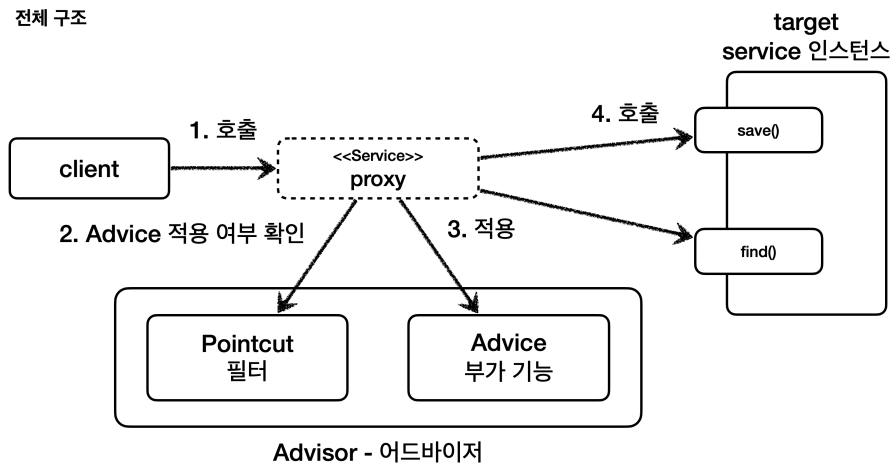
포인트컷 : 어디에 부가기능을 적용할지 판단하는 필터링 로직이다. 주로 클래스와 메서드 이름으로 필터링 한다.
어드바이스 : 프록시가 호출하는 부가기능이다.
어드바이저 : 하나의 포인트컷과 하나의 어드바이스를 가지고 있는 것, (포인트컷1 + 어드바이스1)
포인트컷 설정하기
@Test
@DisplayName("스프링이 제공하는 포인트 컷")
void advisorTest3() {
    // 프록시 만들 실제 객체
    ServiceImpl target = new ServiceImpl();
    ProxyFactory proxyFactory = new ProxyFactory(target);
    // 메서드 이름으로 포인트컷 생성하기
    NameMatchMethodPointcut pointcut = new NameMatchMethodPointcut();
    pointcut.setMappedName("save");
    // 포인트컷과 어드바이스로 어드바이저 생성하기
    DefaultPointcutAdvisor advisor =
            new DefaultPointcutAdvisor(pointcut, new TimeAdvice());
    // 프록시 팩토리에 어드바이저 설정하기
    proxyFactory.addAdvisor(advisor);
    // 프록시 생성
    ServiceInterface proxy = (ServiceInterface) proxyFactory.getProxy();
    // 프록시를 통한 로직 실행
    proxy.save();
    proxy.find();
}
NameMathMethodPointcut 을 생성하고 setMappedNames(..) 으로 메서드 이름을 지정하면 포인트컷이 완성된다.
<스프링이 제공하는 포인트컷>
NameMatchMethodPointcut : 메서드 이름을 기반으로 매칭한다. 내부에서는 PatternMatchUtils 를 사용한다.
AnnotationMatchingPointcut : 애노테이션으로 매칭한다
AspectJExpressionPointcut : aspectJ 표현식으로 매칭한다. 예) "excution(* hello.proxy..*(..))"
여러 어드바이저 함께 적용
@Test
@DisplayName("하나의 프록시, 여러 어드바이저")
void multiAdvisorTest2() {
    //proxy -> advisor2 -> advisor1 -> target

    DefaultPointcutAdvisor advisor2 =
            new DefaultPointcutAdvisor(Pointcut.TRUE, new Advice2());
    DefaultPointcutAdvisor advisor1 =
            new DefaultPointcutAdvisor(Pointcut.TRUE, new Advice1());

    ServiceInterface target = new ServiceImpl();
    ProxyFactory proxyFactory1 = new ProxyFactory(target);
    // 어드바이저 적용 순서대로 실행된다.
    proxyFactory1.addAdvisor(advisor2);
    proxyFactory1.addAdvisor(advisor1);
    ServiceInterface proxy = (ServiceInterface) proxyFactory1.getProxy();

    //실행
    proxy.save();
}
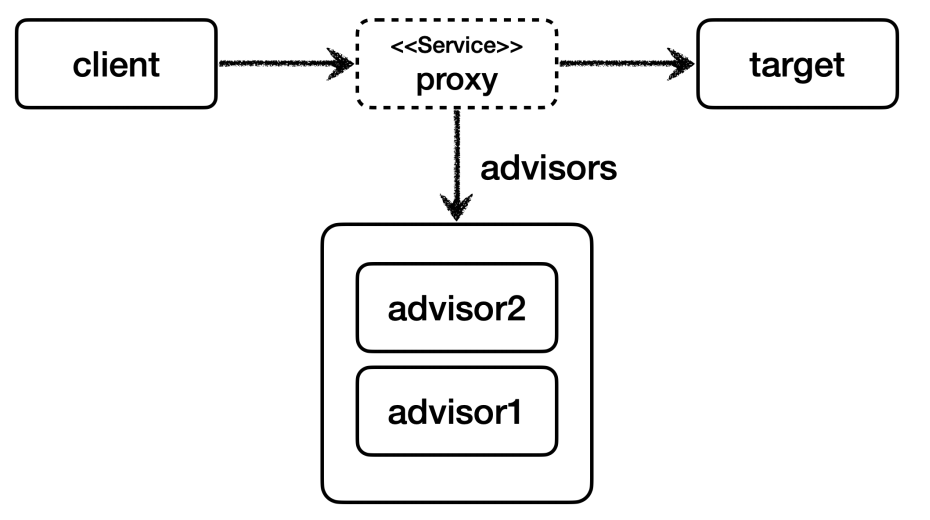
프록시 팩토리에 원하는 만큼 addAdvisor() 를 통해서 어드바이저를 등록하면 된다.
등록하는 순서대로 advisor 가 호출된다. 여기서는 advisor2 , advisor1 순서로 등록했다.
스프링은 프록시는 하나만 만들고, 하나의 프록시에 여러개의 어드바이저를 적용한다.
'프로그래밍 > Spring' 카테고리의 다른 글
| [Spring] 스프링 AOP 구현 (0) | 2024.05.18 |
|---|---|
| [Spring] 스프링 AOP 개념 (0) | 2024.05.17 |
| [Spring] 동적 프록시 (JDK 동적 프록시, CGLIB) (0) | 2024.05.14 |
| [Spring] 동시성 문제와 쓰레드 로컬 (Thread Local) (0) | 2024.05.07 |
| [Spring] 스프링 트랜잭션 전파 (0) | 2024.03.18 |


