
FireDrago
[bobzip] Ajax 비동기 요청을 통한 댓글 작성 본문
댓글작성 (클라이언트)
https://flowerdragon95.tistory.com/204
[bobzip] AJAX 를 이용한 댓글 조회
댓글 조회 (클라이언트 코드)댓글 작성시 페이지를 새로고침 하지 않게 작성해보자 먼저 댓글 조회 로직을 만들고, 댓글 작성시 댓글 조회 로직을 호출해보자 댓글 댓글 입력 댓글 등록 우선
flowerdragon95.tistory.com
댓글 작성에 앞서, 댓글 조회 코드를 만들었다. 이제 댓글 조회를 활용하여,
댓글작성시 비동기로 작성한 댓글이 바로 표시될 수 있도록 만들어 보자
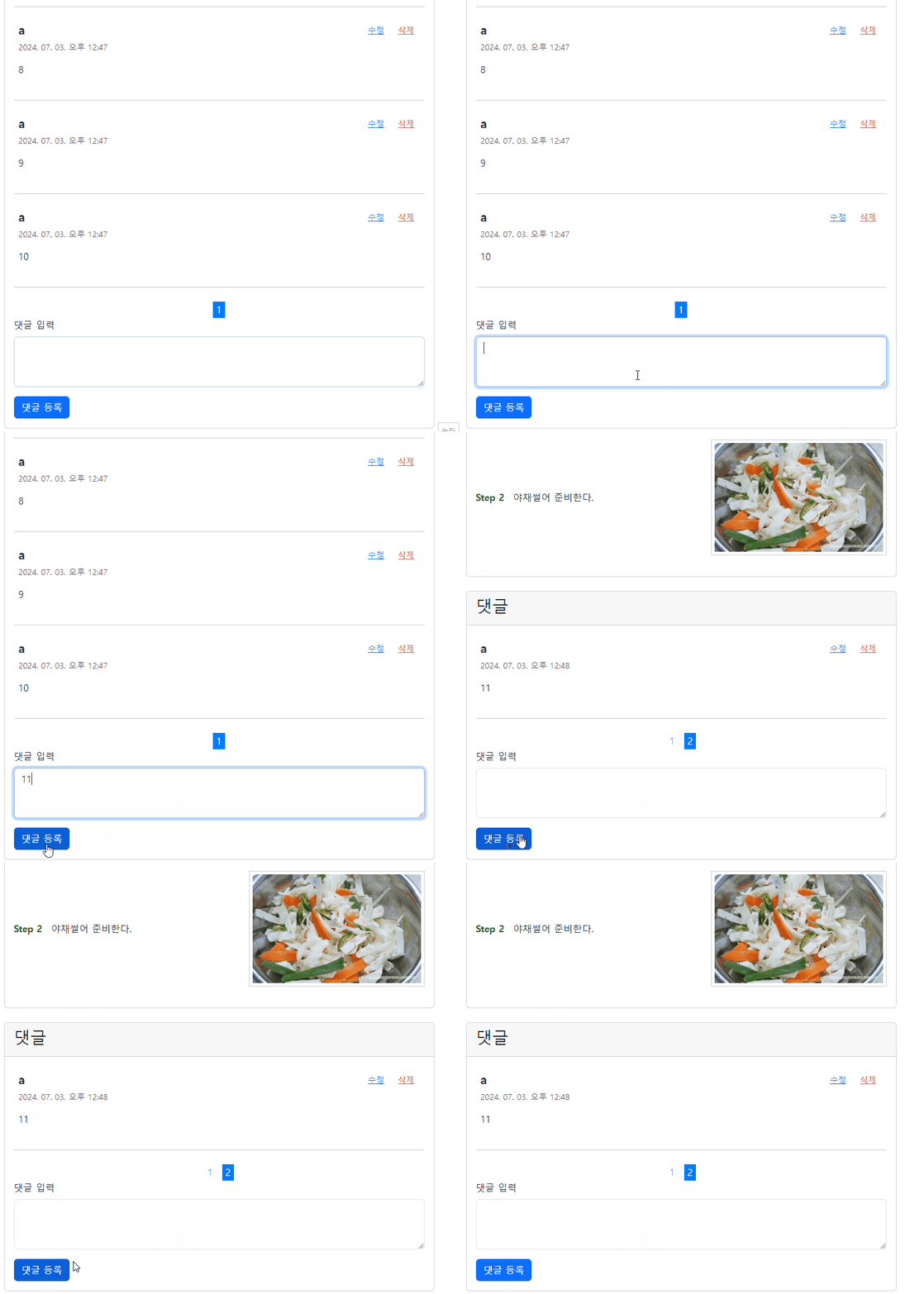
1페이지에서 댓글을 작성했지만, 2페이지 마지막 페이지로 갱신되어 표시되는 것을 확인 할 수 있다.
$(document).ready(function() {
    const recipeId = $('#comments-container').data('recipe-id');

    loadComments(recipeId);

    // 댓글 작성 폼 제출 이벤트 핸들러
    $('#comment-form').submit(function(event) {
        event.preventDefault();
        const commentText = $('#commentText').val();
        addComment(recipeId, commentText);
    });
});
댓글 조회코드 작성시 만든 코드에 댓글 작성 폼 제출 이벤트 핸들러를 작성한다.
$(#comment-form).submit(function(event) {}) : comment-form id를 가진 <form> 태그가 전송될때 실행되는 함수를 정의
event.preventDefault() : 이벤트 진행을 막는다. 폼 객체가 서버로 전송되는 작업을 중단한다.
const commentText = $("#commentText").val() : id: commentText <textarea> 의 입력내용 (댓글내용)을 상수할당
addComment(recipeId, commentText) : 댓글작성 로직을 실행한다. 레시피id와 댓글내용을 함께 전송한다.
function addComment(recipeId, commentText) {
    $.ajax({
        url: "/reply/add",
        method: "POST",
        contentType: "application/json",
        data: JSON.stringify({
            comment: commentText,
            recipeId: recipeId
        }),
        success: function(response) {
            // 댓글 작성 후, 댓글 HTML 추가
            renderComments(response);
            $('#commentText').val('');

            // 페이지네이션 업데이트
            const totalPages = response.totalPages;
            const currentPage = response.number;
            generatePagination(totalPages, currentPage, recipeId);
        },
        error: function(xhr) {
            if (xhr.status == 401) {
                alert("댓글작성하려면, 로그인 해야합니다.");
            } else {
                alert("댓글 작성중 문제가 발생했습니다.")
            }
        }
    });
}
AJAX를 사용하여, 비동기로 댓글작성 url를 호출한다. json의 형태로 recipeId와 commentText를 전달한다.
작성한 댓글을 바로 확인하려면, 서버는 가장 마지막 페이지의 댓글들을 전송해줘야 한다.
서버측 코드를 짤때 어떻게 마지막 페이지를 전송하는지 살펴보자
댓글 작성이 성공했다면 서버는 가장 마지막 페이지의 댓글 정보들을 전송한다.
renderComments(response)를 통해 댓글 데이터들을 HTML 태그로 변환하여 출력한다.
에러가 발생했을때, 그 중에서도 댓글 로그인이 되어있지 않은 경우, 서버는 401 HttpStatus를 전달한다.
그러면 xhr.status 로 401 도착했는지 확인하고, 로그인 안내메시지를 알림창으로 출력한다.
function renderComments(response) {
    $('#comments-container').empty();
    response.content.forEach(appendCommentHtml);
}

function appendCommentHtml(comment) {
    // 날짜 형식 변환 코드
    const date = new Date(comment.createdTime);
    // 한국 표준시 'ko-kr' 지정
    const formattedDate = new Intl.DateTimeFormat('ko-KR', {
        year: 'numeric', // 년도 4자리
        month: '2-digit', // 월 2자리
        day: '2-digit',   // 일 2자리
        hour: '2-digit',  // 시간 2자리
        minute: '2-digit' // 분 2자리
    }).format(date);

    $('#comments-container').append(`
        <div class="p-2 position-relative" id="comment-${comment.id}">
            <div class="d-flex justify-content-between">
                <p class="mb-1 fs-5"><strong>${comment.username}</strong></p>
                <div>
                    <button class="btn btn-sm btn-link" onclick="editComment(${comment.id}, '${comment.comment}')">수정</button>
                    <button class="btn btn-sm btn-link text-danger" onclick="deleteComment(${comment.id})">삭제</button>
                </div>
            </div>
            <p class="text-muted small">${formattedDate}</p>
            <p class="fs-6" id="comment-text">${comment.comment}</p>
        </div>
        <hr>
    `);
}
$('#comments-container').empty() : 댓글이 입력될 <div> 태그를 비워준다. 아무런 자식 태그들이 없는 상태로 초기화
$('#comments-container').append (...) : 표시하고싶은 형식에 맞게 HTML 태그를 추가해준다. 부트스트랩을 사용하여 스타일을 주고, 댓글별 id를 부여한다.
수정과 삭제를 위한 editComment , deleteComment 메서드도 id 에따라 동적으로 생성해준다.
댓글작성 (서버)
서버측에서는 AJAX 요청에 맞게 댓글 정보를 작성하고, 마지막 페이지 정보를 전달 한다.
@Slf4j
@RestController
@RequestMapping("/reply")
@RequiredArgsConstructor
public class ReplyController {

    private final ReplyService replyService;

    @GetMapping("/all/{recipeId}")
    public Page<ReplyDto> getRepliesByRecipeId(@PathVariable("recipeId") Long recipeId,
                                               @PageableDefault(size = 10, page = 0, sort = "createdTime") Pageable pageable) {
        Page<Reply> replyPage = replyService.findAll(recipeId, pageable);
        Page<ReplyDto> reply = ReplyDto.toDtoReplyPage(replyPage);
        return reply;
    }

    @PostMapping("/add")
    public ResponseEntity<Page<ReplyDto>> addReply(
            @RequestBody ReplyAddForm replyAddForm, HttpSession session) {
        Member loginMember = (Member) session.getAttribute(LoginConst.LOGIN);
        // 로그인 하지 않은 경우, 401 상태 반환
        if (loginMember == null) {
            return ResponseEntity.status(HttpStatus.UNAUTHORIZED).body(null);
        }
        Long recipeId = replyAddForm.getRecipeId();
        Reply reply = replyService.addReply(replyAddForm, loginMember);
        Long replyCounts = replyService.countAllReplies(recipeId);
        int lastPage = ((int) Math.ceil((double) replyCounts / 10)) - 1;

        Page<ReplyDto> replyDtoPage = getRepliesByRecipeId(recipeId, PageRequest.of(lastPage, 10));
        return ResponseEntity.ok(replyDtoPage);
    }
@RequestBody ReplyAddForm replyAddForm : json으로 전달된 레시피id와 댓글 내용을 DTO로 받기위해 @RequestBody를 사용했다.
Long recipeId = replyAddForm.getRecipeId();
Reply reply = replyService.addReply(replyAddForm, loginMember);
Long replyCounts = replyService.countAllReplies(recipeId);
int lastPage = ((int) Math.ceil((double) replyCounts / 10)) - 1;
1. 댓글을 저장한다. 이때 replyAddForm 과 loginMember 를 함께 전달한다. 작성자 정보도 필요하기때문이다.
2. 레시피 id 에 달린 총 댓글 수를 구한다. (replyCounts)
3. 총 댓글 수를 페이지당 표시수 (10) 로 나누어 마지막 페이지 값을 구한다. (lastPage)
4. 조회 메서드를 통해 마지막 페이지 PageRequest를 전달하면, 마지막 페이지 Page<Reply> 값을 구할 수 있다.
DTO 변환 메서드를 통해 Page<ReplyDTO>로변환하여 전송한다. JSON 형태로 클라이언트에게 전송된다.
@Service
@Transactional(readOnly = true)
@RequiredArgsConstructor
public class ReplyService {

    private final ReplyRepository replyRepository;
    private final RecipeRepository recipeRepository;

    public Page<Reply> findAll(Long id, Pageable pageable) {
        return replyRepository.findByRecipeId(id, pageable);
    }

    @Transactional
    public Reply addReply(ReplyAddForm replyAddForm, Member loginMember) {
        Recipe findRecipe = recipeRepository.findById(replyAddForm.getRecipeId())
                .orElseThrow(()-> new IllegalArgumentException("레시피를 찾을 수 없습니다."));

        Reply reply = Reply.builder()
                .recipe(findRecipe)
                .member(loginMember)
                .comment(replyAddForm.getComment())
                .build();

        replyRepository.save(reply);
        return reply;
    }

    public Reply findById(Long commentId) {
        return replyRepository.findById(commentId).orElse(null);
    }

    public Long countAllReplies(Long recipeId) {
        return replyRepository.countByRecipeId(recipeId);
    }
}
public interface ReplyRepository extends JpaRepository<Reply, Long> {
@Query("select r from Reply r JOIN FETCH r.member where r.recipe.id = :recipeId")
Page<Reply> findByRecipeId(@Param("recipeId") Long recipeId, Pageable pageable);
@Query("select count(r) from Reply r where r.recipe.id = :recipeId")
Long countByRecipeId(@Param("recipeId")Long recipeId);
}서비스 객체와 리포지토리 객체는 이렇게 만들었다. 이해가 어려운 지점은 딱히 없을 것이다.
'프로젝트' 카테고리의 다른 글
| [bobzip] QueryDsl 활용하여 냉장고 재료로 레시피 검색하기 (0) | 2024.07.11 |
|---|---|
| [bobzip] Ajax 비동기 요청을 통한 댓글 수정 (0) | 2024.07.05 |
| [bobzip] AJAX 비동기 요청을 통한 댓글 조회 (0) | 2024.07.02 |
| [bobzip] 다중 MultipartFile 이미지를 포함한 엔티티 수정하기 (0) | 2024.06.24 |
| [bobzip] JPA 엔티티의 equals 구현 (동등성) (0) | 2024.06.15 |


